
Process Map
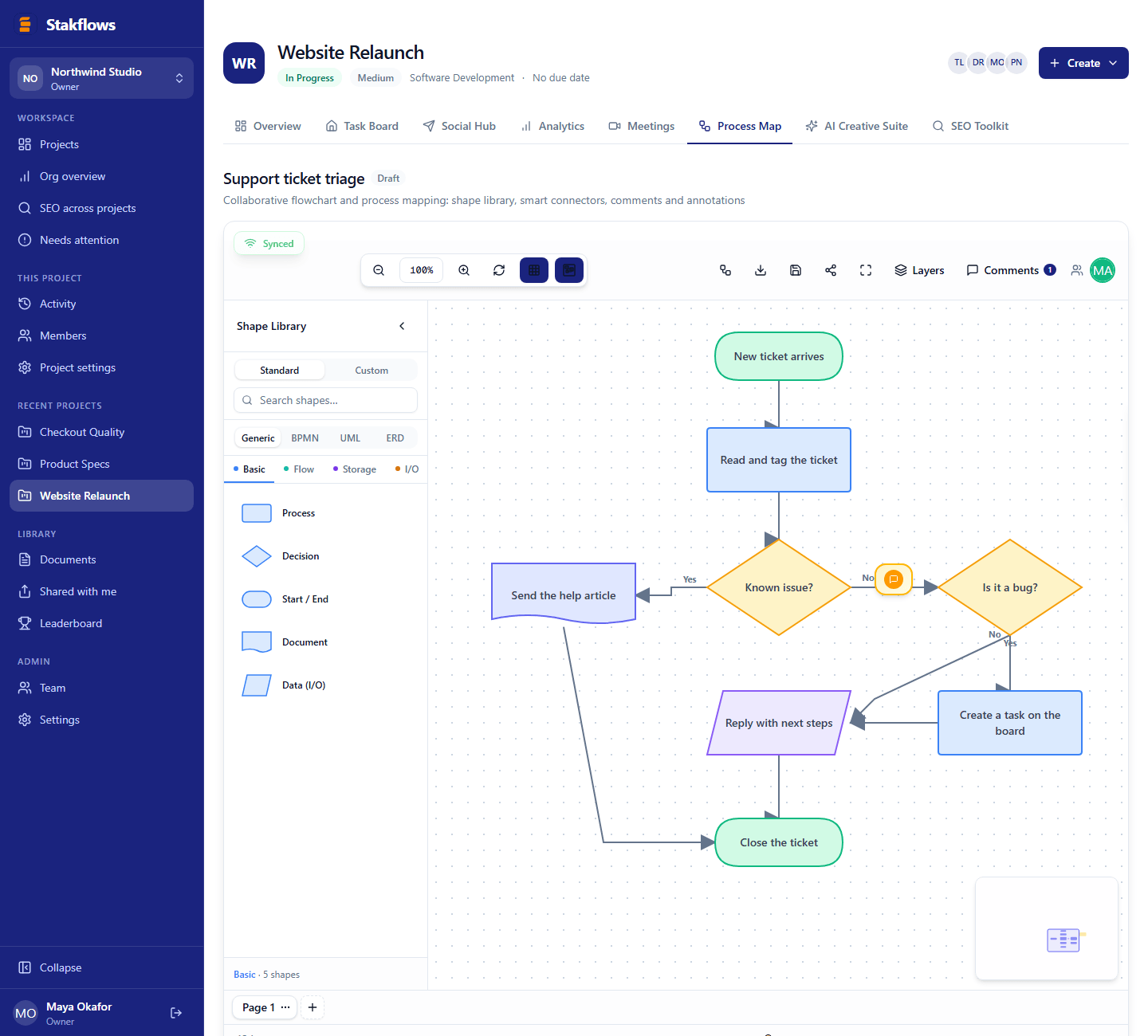
Available, growingA shared canvas for flows, systems and workflows, with live cursors, comments and AI help to start a diagram.
Who it is for
Business analysts, architects, operations teams and anyone documenting a process. Map user journeys, system architectures and cross-team workflows on one shared canvas, next to the tasks and documents they relate to.
What you can do today
Shapes and smart connectors
Draw with shape sets for flowcharts, BPMN, UML and entity-relationship diagrams. Connectors snap to the shapes and route around them, and auto-arrange tidies a selection for you.
Live cursors and presence
See where your teammates are working on the canvas while they work.
Comments and sticky notes
Pin comments to the canvas, reply in threads and resolve them. Sticky notes keep short notes beside the diagram.
Link shapes to your work
Link a shape to a task, a test case or a document, and create a task straight from a shape.
Pages and layers
Keep several pages in one map, and show, hide, lock and reorder layers on each page. How many pages a map can hold depends on your plan.
Export, import and share
Export as PNG, SVG, JSON or a vector PDF, import draw.io files, or share a view-only link that needs no login.
Your own shapes
Add shapes of your own to a custom library and reuse them across maps. Available on Pro and above.
How it works
- 1Start a mapOpen Process Map in your project and start on a blank canvas, import a draw.io file, or describe the process and let AI draw a first draft.
- 2Add shapes and connect themDrag shapes from the libraries and connect them. Connectors snap to the shapes and route around them.
- 3Work on it togetherInvite your team. See their cursors, leave comments, and link shapes to tasks, test cases and documents.
- 4Export or shareExport the diagram for a document or a review, or share a view-only link.
AI in this tool
On plans with AI access (Pro and above), describe a process in plain text and AI draws a first version for you: connected shapes on your canvas that you can edit like any other.
AI draws a starting point. It does not check your process for accuracy, make architecture decisions or sign anything off. Each use draws on your organization's AI credits.
What is coming
- Microsoft Visio (.vsdx) import and export: Open Visio files and save diagrams back to them. Planned; nothing is built yet.
Works with
Plans
- Process Map: available from the Free plan
Process Map is on every plan, with limits. Pages per map: Free 2, Pro 10, Business and Enterprise unlimited. Custom shapes: Free none, Pro 25, Business and Enterprise unlimited. AI drawing needs a plan with AI access (Pro and above).
Questions
Which kinds of diagram can I draw?
The shape libraries cover generic flowcharts, BPMN, UML and entity-relationship diagrams.
Can several people edit a map at the same time?
Yes. Teammates working on the map appear with live cursors, and comments and sticky notes live on the canvas.
What can I export?
PNG, SVG, JSON and a vector PDF, for the whole diagram or a selection. You can also import draw.io files and share a view-only link.
How many pages can one map have?
Free: 2. Pro: 10. Business and Enterprise: unlimited. A project has one map.
Can I work with Visio files?
Not yet. Visio import and export is planned but not built. draw.io files can be imported today.